
Stay ahead of the curve with expert WordPress tips, practical tutorials, security insights, and the latest industry updates. Whether you’re troubleshooting a website issue, improving performance, or protecting your site from security threats, The WordPress Pulse delivers the knowledge you need to keep your WordPress website running at its best.
Latest WordPress Tips & Insights
WordPress is constantly evolving, and keeping up with the latest developments can make a big difference in your website’s security, functionality, and performance. Explore expert advice, helpful tutorials, and actionable insights designed to help you get more out of your WordPress website.
From new features and plugin recommendations to common mistakes and best practices, we break down complex WordPress topics into straightforward guidance you can actually use.
FIXED “Your PHP installation appears to be missing the MySQL extension which is required by WordPress.” Host Gator Issue

Ned this fixed? YPHP Installation Appears to be Missing If you are currently hosting your WordPress website or several WordPress websites at HostGator and you’ve come across “Your PHP installation appears to be missing the MySQL extension which is required…

10 Best Online Resources to Learn WordPress in 2021
Need to learn Learn WordPress in 2021? WordPress is one of the biggest platforms that help in the management of your content. It serves as a content manager for years and is still one of the smartest tools for this…
18 Best WordPress Security Practices
Want to know the best WordPress security practices? WordPress is a web publishing application that helps you to create and manage your website or blog. It is one of the more popular web publishing platforms used and empowers more than…

Allow Access to Your Site Without a Username and Password
Do you need to allow access to your site without a username and password? We can not tell you how many times we have had difficulty getting access to the admin area of a WordPress site so we can fix…
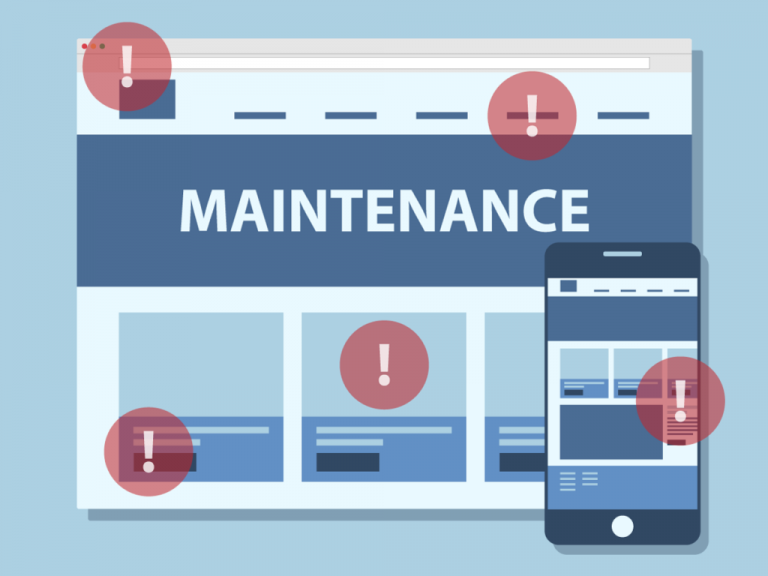
WordPress Maintenance Tasks to Perform Regularly
It is so important to perform WordPress maintenance tasks! If you run your business or blog on a WordPress website, then steer away from anything that might lead to a broken site. In terms of user experience, a broken website,…

3 Plugins to Turn Your WordPress Website into a Mobile App
Want to turn your WordPress website into a mobile app? Mobile app development is an expensive and time-consuming process ranging between $37,000 and $500,000, and requiring up to 5,000 hours of work. But it doesn’t have to be that way.…

FIXED WordPress Jetpack Plugin Error on Line 41
Need to fix a WordPress Jetpack Plugin Error? WordPress Jetpack Plugin Error will cause you to see the below error message when you try to load your website? If so it is possibly due to the fact of a Jetpack…

How to Fix WordPress Plugin Conflicts
Need to fix WordPress plugin conflicts? WordPress is a wonderful Content Management System and that goes without a doubt. The sheer seamless of the platform makes it the beginners’ favorite. However, as a WordPress novice, you might often encounter a…

How to Use WordPress to Drive Sales – With 9 Awesome Examples
Starting a company blog is one of the best long-term decisions you can make to boost your digital marketing efforts. A blog can attract more traffic to your website, improve your search engine rankings, and help your brand, your company,…
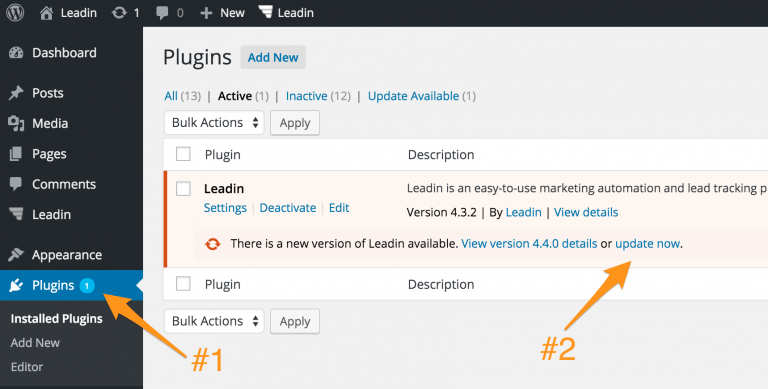
The Easiest Way to Update WordPress Premium Themes and Plugins
Need to Update WordPress Premium Themes? WordPress has a built-in feature to install themes and plugins by supplying a zip file. Unfortunately, you cannot upgrade a theme or plugin using the same process. Instead, WordPress will say “destination already exists”…

15 Essential Steps to Secure WordPress Against Malware Attacks
Need to secure WordPress against malware attacks? Secure WordPress Against Malware Attacks is an essential part of a webmaster’s role. It’s your virtual property that you need to secure to ensure that it’s not vulnerable to attacks and exploitation. That…

9 Stunning WordPress Themes for Mommy Bloggers
Looking for WordPress themes for mommy bloggers According to the women who have discovered the beauty and challenge of motherhood, there’s nothing more amazing in this world than bringing a new life into it. Giving yourself up to parenthood is…
WordPress Security & Malware Prevention
Keeping your WordPress website secure is essential for protecting your business, your customers, and your online reputation. Cybersecurity threats, malicious plugins, outdated software, and website vulnerabilities can put your entire online presence at risk.
Discover practical WordPress security tips, malware prevention strategies, website protection recommendations, and expert insights to help safeguard your website against hackers, infections, and unexpected security issues.
WordPress Troubleshooting Guides
WordPress errors can happen when you least expect them. Whether you’re dealing with the white screen of death, plugin conflicts, broken layouts, database connection errors, or unexpected website behavior, finding the right solution quickly matters.
Our WordPress troubleshooting guides help you understand common website problems, identify potential causes, and explore practical solutions. Get expert guidance to resolve issues, minimize downtime, and keep your website functioning smoothly.
Website Speed & Performance
A fast, responsive website creates a better experience for visitors and can support stronger search engine performance. Slow page loading, inefficient plugins, oversized images, and poorly configured hosting environments can all affect your WordPress website’s speed.
Explore WordPress performance optimization tips, caching recommendations, Core Web Vitals insights, and proven strategies for improving website speed, reliability, and overall user experience.
WordPress Maintenance & Best Practices
A healthy WordPress website requires ongoing attention. Regular software updates, reliable backups, security monitoring, and preventative maintenance help reduce unexpected problems and keep your website operating efficiently.
Learn essential WordPress maintenance best practices, discover ways to improve website stability, and understand how proactive website management can help prevent costly issues before they happen.
Expert WordPress Help When You Need It
Sometimes, even the best tutorials aren’t enough to solve a complicated WordPress problem. That’s where WP Fix It comes in.
Our WordPress support experts specialize in troubleshooting, malware removal, website performance, security, and ongoing WordPress maintenance. Whether you’re facing an urgent website issue or looking for long-term peace of mind, we’re here to help you keep your WordPress website secure, reliable, and running smoothly.
Need help with your WordPress website? Get Expert WordPress Support and let our team take care of the technical headaches.
