
Want to know why you should use the WordPress CMS platform?
Undoubtedly, it’s a fact that there’s an advantage of WP over other CMS platforms. In this article, we shall be discussing the reasons why we vouch for this statement. Till date, many blogging platforms have come into play, but none of these has proved their effectiveness as WordPress.
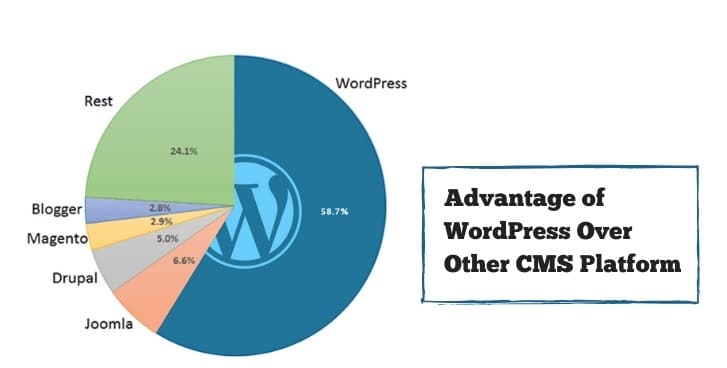
WordPress has been a simple and user-friendly blogging platform that even the beginners can use to publish their blog posts. From businesses to newbies, everyone has been using this platform to manage their content and publish their posts on the website since inception. If you have been planning to build a new website but can’t think of which CMS to use, then read on to know what advantages WordPress offers when compared to the other platforms.
WordPress Is User-Friendly – WordPress CMS Platform
One of the major reasons why people stop pursuing their dream of maintaining a website properly is the complexity of CMS. When compared to the other CMS platforms, WordPress is not at all complex and is even preferred by those who offer eCommerce website development services for easy management and easy uploads.
The user-friendly feature of the WP platform makes it easier for the newbies to embark on their journey in the field of blogging.
WordPress Can Be Accessed Anywhere – WordPress CMS Platform
One of the major reasons why there’s an advantage of WP over other CMS is that you can actually access WP platform absolutely anywhere and on any device, provided you have a stable internet connection. Even while traveling, if you prefer to update the WP content, you can actually log on to your mobile device and download the WP tool to log in and edit or upload the content on the website.
In this manner, the dependency to reach your workstation and upload the content would not be there. With this easy-to-login feature, users can access their personal blogs anywhere and edit it without taking any additional help from their developer, who may, in turn, charge very high to maintain and update the website.
WordPress Is Search Engine-Friendly – WordPress CMS Platform
Unlike the other CMS platforms, WP is search engine-friendly due to the presence of a few simple codes, which make the content pages ideal for indexation by Google. This, in turn, can improve the website ranking in the long run. The platform comes equipped with both paid and free SEO tools and plugins that help us in identifying the fixes that are required in the blog posts to make it search engine-friendly.
WordPress Platform Has a Responsive Web Design – WordPress CMS Platform
The best part about this platform is that it contains both free and paid themes, which can be applied to your website to become responsive. Applying responsive themes to the respective blogs have become mandatory since the past few years as most of the users prefer using mobile to surf through the sites. Hence, it is important to have a responsive design so that the users do not face any difficulty in accessing and reading the blog posts that you have published on the website.
WP themes can easily optimize the website, which can be accessed easily on any device and this advantage of WP over other CMS is tremendous.
Equip Your Site with More Features Easily – WordPress CMS Platform
With each passing day, the existing features of any site become obsolete and need immediate updating. The new bloggers become overwhelmed with the updates and tend to mess up in the process of upgrade. With WordPress platform as your CMS platform, you can actually skip the tension and with the help of useful plugins available on the platform you can install and upgrade the look of the site. At any point in time, you can actually update the plugins and enhance the existing features present on the site.
Additionally, WP platforms can help you to be self-dependent in terms of publishing and updating the blog post without being dependent on your developer.
End Note – WordPress CMS Platform
These amazing features justify the fact that the advantage of WP over other CMS is actually amazing. Hence, almost all the eCommerce website development services prefer WordPress over many other existing platforms.

What Is WordPress CMS and How Does It Work?
WordPress is a content management system (CMS), which means it provides the tools needed to create, organize, edit, and publish website content without requiring every update to be handled in code. A WordPress site generally has two parts: the software that manages content and the theme that controls much of the site’s appearance. Plugins can add features such as forms, search engine optimization tools, or other functionality.
To manage a site, sign in to the WordPress dashboard through a web browser. From there, a site owner can write or edit posts and pages, upload media, change settings, update themes and plugins, and manage users according to their permissions. This is why WordPress can be used by beginners while still offering room for more advanced customization.
WordPress is not automatically the same as a website design, web host, or SEO service. The hosting environment stores the site and makes it available online, while the WordPress CMS manages the content. A theme also does not guarantee that every page will be mobile-friendly; the chosen theme and its configuration should be tested on phones and tablets before publication.
Before choosing WordPress, check the practical requirements of the site:
- Content management: Confirm that the dashboard supports the posts, pages, media, and user roles your team needs.
- Design: Choose a responsive, maintained theme and review important pages at different screen sizes.
- Features: Add only the plugins required for the site’s goals, and check that they are compatible and actively maintained.
- Maintenance: Keep WordPress, themes, and plugins updated, and create a backup before significant changes.
- SEO: Use readable content, sensible page settings, and an appropriate SEO tool, but remember that a CMS alone cannot guarantee search rankings.
These distinctions make it easier to evaluate WordPress as a CMS platform: it simplifies routine publishing and can be extended over time, while site owners remain responsible for selecting suitable themes, plugins, hosting, and maintenance practices.